Free for Mac · for Claude Code
Know what Claude is doing,
from across the room.
A floating board with one lamp for each Claude Code session. It glows while Claude works, blinks when Claude needs you, and goes dark when the turn is done. For the Claude desktop app and claude in the terminal.
Free · Version 1.1.2 · 0.6 MB · macOS 13 or later · Apple silicon and Intel · notarized by Apple
A live replica of the board, with the app’s own colors, proportions and timing. Try the three color schemes.
Lightweight
Light enough to forget. Bright enough to notice.
Out of Claude’s way
The hook prints nothing, always succeeds and never changes what Claude does. It only notes what each session is up to.
Sound in its own process
Alert sounds play in a separate, short-lived process, so no audio code ever loads into Watchlamp itself.
Online only when you ask
No network use, except when you check for updates or send a review or suggestion. No analytics, no account.
The lamps
Three states. One glance.
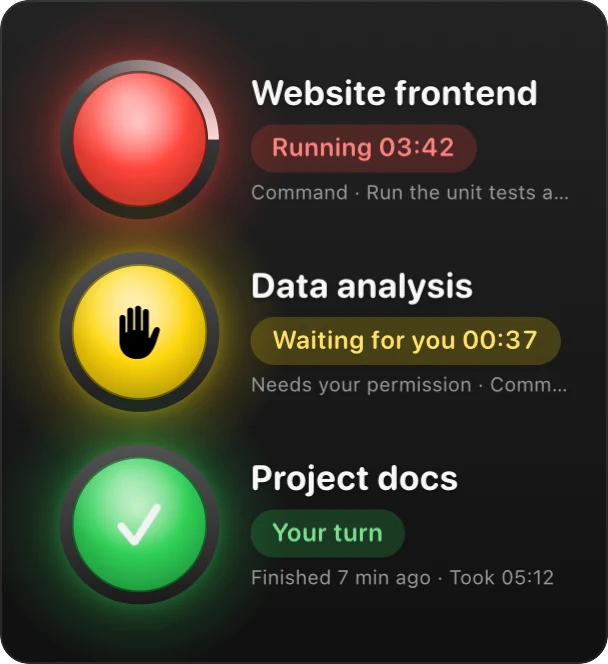
Every Claude Code session gets its own lamp, named after its project. Click a lamp to jump to the app that session runs in.
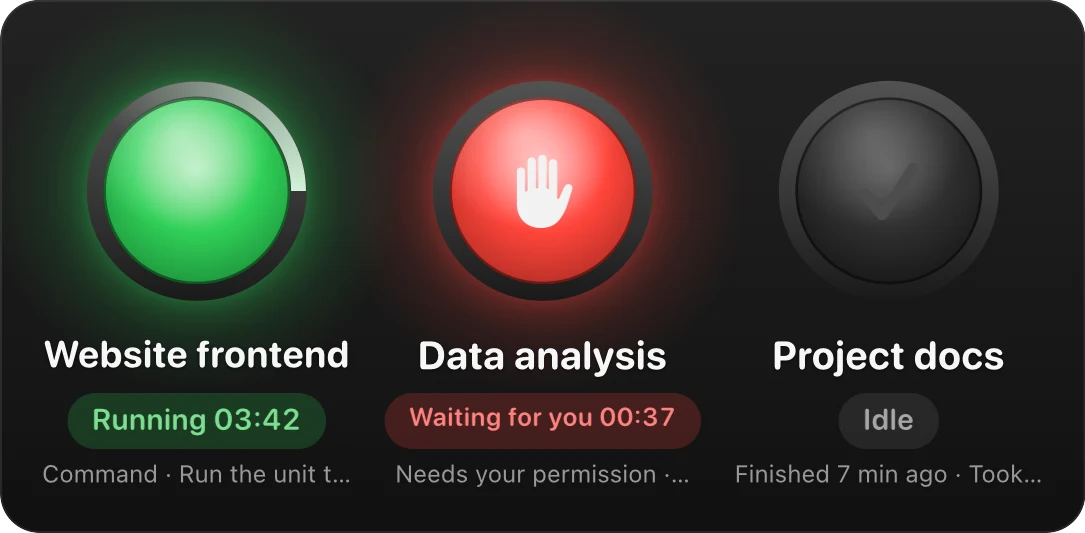
Running
Glows and breathes, with a light circling the rim. Under the lamp: how long the turn has run and what Claude is doing right now.
Waiting for you
Blinks with a raised hand when Claude needs you: a permission prompt, a question, or a plan to approve.
Stopped on an error? An exclamation mark takes the hand’s place.
Done
Goes dark with a check mark, or lights up green in the Your turn colors. Under the lamp: when the turn finished and how long it took.
Colors
Three color schemes. Pick the one that reads right.
Choose one here and every lamp on this page follows. In the app, it’s one click in the menu.
Sizes
Six sizes. Up to 360 points across.
From a corner of a laptop screen to a display on the far wall. Text and margins grow with the lamp, so the board keeps its proportions at every size.
Horizontal or vertical.
Line the lamps up in a row, up to four before it wraps, or stack them in a column beside your work. Drag the board to any screen; it stays where you put it.
Sound and language
Hear it when you look away. Read it in your language.
Two sounds, as loud as you need.
One sound when Claude needs you, another when a turn is done. Pick any macOS alert sound, or one of your own. Past 100%, alerts play louder than other apps’ at the same system volume, up to 400%.
Twelve languages.
Watchlamp follows your Mac’s language, or you can pick one from its menu. In Arabic, the whole board is mirrored.
- EnglishWaiting for you
- EspañolTe espera
- Português (Brasil)Aguarda você
- FrançaisVous attend
- DeutschWartet auf dich
- ItalianoTi aspetta
- РусскийЖдёт вас
- العربيةmirroredبانتظارك
- 日本語操作待ち
- 한국어확인 필요
- 简体中文等你操作
- 繁體中文等你操作
Details
Out of your way. Until it shouldn’t be.
Screen edge glow.
When Claude needs you, the border of every screen lights up, so you notice even with the board out of sight. The mouse clicks right through it.
One click to the session.
Click a lamp to switch to the app its session runs in: the Claude app, Terminal, VS Code and others.
On top, if you like.
Keep the board above every window, full-screen apps included, or let it behave like an ordinary window.
One-click connect.
Watchlamp adds its hooks to ~/.claude/settings.json and leaves everything else as it was.
Signed, notarized, free.
Signed with a Developer ID and notarized by Apple, so it opens like any app. No ads, no account.
Install
Running in a minute.
Download
Get the disk image and open it.
Drag to Applications
Drag Watchlamp into the Applications folder, then open it from there.
Connect
Click Connect to Claude Code. Watchlamp backs up
~/.claude/settings.json, then adds its hooks.
Needs macOS 13 or later and Claude Code, the desktop app or the CLI. To remove Watchlamp, choose Disconnect from Claude Code in its menu, quit, and drag it to the Trash.
Reviews
What people say.
Reviews are written in Watchlamp itself (right-click the board) and appear here after a quick check.
FAQ
Questions, answered.
Is Watchlamp free?
Yes. There are no ads, no account, no trial and no time limit.
Does it work with the Claude desktop app and the CLI?
Both. Watchlamp follows Claude Code’s hooks, which run in the desktop app’s Code tab and in claude in the terminal.
Does it change how Claude Code behaves?
No. Its hook takes about 15 ms, prints nothing and always succeeds. It only notes what each session is doing.
What does it send over the internet?
Only what you ask it to: the update check, which reads a small version file from thermport.com, and any review or suggestion you send from its menu. There are no analytics and no account.
Is Watchlamp made by Anthropic?
No. Watchlamp is an independent app and is not affiliated with Anthropic. Claude and Claude Code are trademarks of Anthropic.
Where do I leave a review, a suggestion or a tip?
In the app: right-click the board, and you’ll find all three in Watchlamp’s menu. You can also write to feedback@thermport.com.
Let Claude work. The lamp will tell you.
Free · 0.6 MB · macOS 13 or later · Apple silicon and Intel